How to spot and handle spam emails
Recently, we have been made aware of an increase in spam emails that appear to come from Rev'd Dr Sonia Hicks, our District Chair. These emails are often carefully crafted to look legitimate, but they are not from Sonia. Responding to or clicking links in these emails can put your personal information at risk. In light of these spam emails, we've put together this guide to let you know what to look out for, and the best ways to handle suspicious emails.
What to look out for
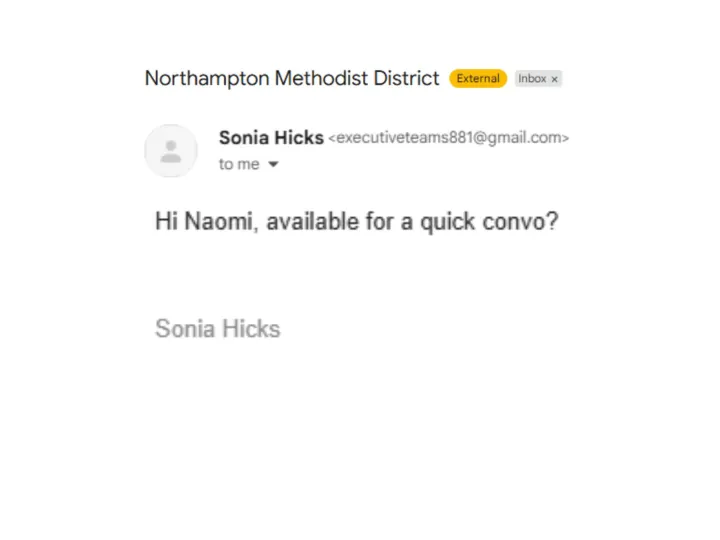
Attached to this article is a picture showing a spam email which Naomi (Digital Enabler) received, claiming to be from Sonia. Please take a quick look at this email and then continue reading the article.
1. Check the sender's email address carefully
Even if the email says it's from Sonia, or indeed from anyone else you know, please look closely at the sender's email address. Spam emails often use addresses that look similar but are slightly different (e.g. misspellings or extra characters).
Example in the attached image: in the email Naomi received, the sender's email address is 'executiveteams881@gmail.com' which is not Sonia's address. This was Naomi's first warning sign.
2. Beware of urgent or alarming requests
Spammers often create a sense of urgency (e.g. "please send this information immediately") to pressure you into acting without thinking.
Example in the attached image: while in this example, the language isn't hugely urgent, the email would require Naomi to reply to the message, and the language implies that it should be done promptly.
3. Look for unexpected attachments or links
Legitimate emails are unlikely to include unusual attachments or ask you to click a link and enter sensitive information.
While the example above didn't ask Naomi to click on anything, it is worth being aware of this – scammers often ask for payment details or personal information via a link, or attach a file which might have a virus, for instance.
4. Check for unusual grammar or tone
Even if the email seems somewhat familiar, strange phrasing, grammar mistakes, or an unusual tone can indicate it's not from the person it first appears to be from.
Example in the attached image: the subject of the email Naomi received is "Northampton Methodist District" – this would be an unusual subject for Sonia to use in an email to Naomi, which further indicated that it was spam. Naomi was also aware that Sonia has a more comprehensive email signature than the one in this email, which includes information like her full title, her role, her mobile number, and the Methodist Church Privacy Notice. The lack of this information was telling.
Do's and Dont's
Do:
- Verify the email address before taking any action. Emails from Sonia will come from district.chair@northamptonmethodistdistrict.org.uk
- Hover over links to see the URL before clicking – if the URL is unfamiliar or unexpected, don't click on it
- Delete emails that are clearly spam
Don't:
- Don't panic! Take a breath and work through the steps below calmly. Feel free to email or call Naomi Ensor (details below) if you would like guidance
- Don't respond to emails that seem suspicious
- Don't click on links or download attachments from unknown sources (remember, check the email address first!)
- Don't share any sensitive information (passwords, personal information, financial details etc) via email
- Don't assume an email is safe just because it appears to come from someone you know
Quick tip: if you're unsure, it's always safer to contact Sonia through a known, official channel rather than replying directly to the suspicious email.
Useful email addresses:
- Sonia's PA's (Joanna) email address: pa@northamptonmethodistdistrict.org.uk
- Sonia's official District Chair email address: district.chair@northamptonmethodistdistrict.org.uk
- District office email address: office@northamptonmethodistdistrict.co.uk
- Digital Enabler's (Naomi) email address: digital@northamptonmethodistdistrict.org.uk
Useful phone numbers:
- District office: 01604 630128
- Digital Enabler (Naomi): 07548 315535
Get In Touch
Postal Address: c/o Northampton Methodist District
Bouverie Court, 6 The Lakes, Bedford Road, Northampton, NN4 7YD
Telephone: 01604 630128